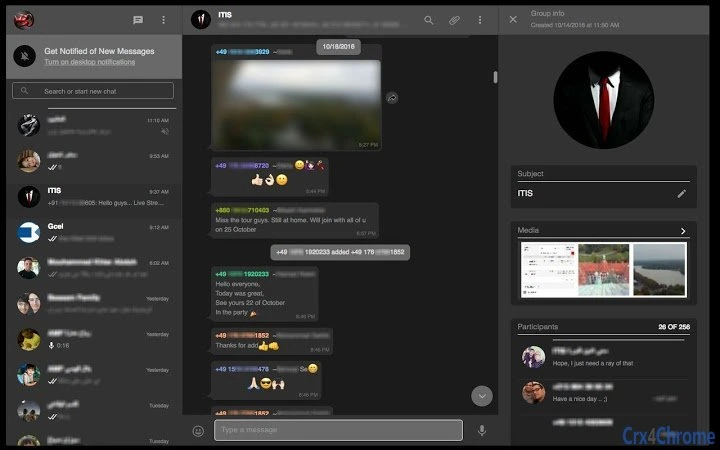

Dark Mode for WhatsApp Web
Overview
The Dark Mode for WhatsApp Web is a lightweight browser extension designed to transform the default light interface of WhatsApp Web into a visually soothing dark theme. Its primary purpose is to reduce eye strain during prolonged use, especially in low-light environments. The tool is ideal for users who spend significant time on WhatsApp Web across multiple devices, including desktops and laptops. It supports Windows, Mac, and Linux platforms, making it accessible to a broad audience of professionals, remote workers, students, and casual users who prioritize visual comfort and screen readability.
Developed independently by ApoloSolutions,com, the software operates as a third-party enhancement with no official affiliation to WhatsApp Inc. It does not modify the core WhatsApp Web application but instead applies a custom stylesheet to alter the interface appearance. This approach ensures minimal interference with the platform’s functionality while delivering a more comfortable viewing experience. Real-world use cases include late-night messaging, extended work sessions, and users with light sensitivity or visual fatigue.
Key Features & Capabilities
- Dark Interface Theme – Applies a full-screen dark color scheme to WhatsApp Web, reducing brightness and glare.
- Eye Strain Reduction – Designed to minimize visual fatigue during extended screen sessions.
- Cross-Platform Compatibility – Functions on Windows, Mac, and Linux systems through supported web browsers.
- Lightweight Installation – The extension has a small footprint of 1.5 MB, ensuring quick setup and minimal system impact.
- Non-Intrusive Design – Works without altering WhatsApp Web’s core features or data handling processes.
Users can apply the theme with a single click after installation, making it suitable for individuals seeking immediate visual relief. The extension is particularly beneficial for those who frequently switch between devices or use WhatsApp Web in dimly lit rooms. It enhances accessibility for users sensitive to bright screens, aligning with broader usability principles in digital interface design.
User Interface, Workflow & Performance
The user interface of the Dark Mode for WhatsApp Web is minimal and focused on functionality. Once installed, it operates in the background, automatically applying the dark theme when WhatsApp Web is accessed. No additional configuration is required, which contributes to a seamless user experience. Navigation within WhatsApp Web remains unchanged, preserving the original layout and interaction model.
Workflow efficiency is high due to the instant activation and passive operation. The extension does not require user input after installation, reducing friction for daily use. Performance details were not specified by the developer, but based on its lightweight nature and non-invasive approach, it is expected to have negligible impact on browser performance. The developer did not specify resource usage details, including CPU or RAM consumption.
Stability appears to be consistent, as the software functions as a stylesheet overlay rather than a core application. It does not interfere with WhatsApp Web’s data transmission or session management. No reported issues related to crashes or conflicts were provided.
Compatibility & System Requirements
The Dark Mode for WhatsApp Web is compatible with Windows, Mac, and Linux operating systems. It functions within standard web browsers that support extensions, though specific browser versions were not listed. The installation size is 1.5 MB, indicating a compact deployment package.
Exact system requirements were not listed. The developer did not provide additional system requirements beyond the supported OS platforms. Compatibility information is limited to the operating systems mentioned. Users should ensure their browser supports extension installation and has JavaScript enabled to use the theme effectively.
Pros and Cons
Pros
- Reduces eye strain during long sessions on WhatsApp Web
- Simple one-click activation after installation
- Lightweight and fast to install (1.5 MB)
- Works across multiple operating systems: Windows, Mac, Linux
- Non-invasive—does not alter core WhatsApp Web functionality
Cons
- No official support from WhatsApp Inc.
- Dependent on browser extension support and updates
- Performance and resource usage details not disclosed
- May not work if browser security settings block third-party extensions
- Updates are not tied to WhatsApp Web’s official release cycle
FAQ Section
Is the Dark Mode for WhatsApp Web compatible with all browsers?
The extension works with web browsers that support extensions, but specific browser compatibility was not detailed by the developer.
Is the software safe to use?
As a third-party extension, it applies only visual styling and does not access or transmit user data. However, users should ensure their browser settings allow trusted extensions.
How do I update the extension?
Updates are managed through the browser’s extension store. Users should check for updates manually or enable automatic updates if available.
Can I use this tool offline?
Yes, once installed, the extension functions without an internet connection, as it only modifies the display layer.
Is this software free to download?
Yes, the software is available at no cost. No payment or subscription is required for access.
Final Thoughts + CTA
The Dark Mode for WhatsApp Web delivers a focused, effective solution for users seeking visual comfort while using WhatsApp on desktop browsers. Its minimal design, broad OS support, and instant usability make it a practical choice for anyone who uses WhatsApp Web regularly. While it lacks official backing from WhatsApp Inc., its non-invasive nature ensures it does not compromise security or functionality.
For professionals, students, and remote workers who value accessibility and reduced eye strain, this tool offers a meaningful enhancement to their digital experience. It stands out as a reliable, lightweight utility that improves usability without complexity.
Download Dark Mode for WhatsApp Web now







